Monday, October 7, 2013

CRI Adaptive Rowing Project Post #1

Our class beginning to work with our community partner, Community Rowing, Inc. This first post is basically just me exploring adaptive rowing.

Adaptive Rowing Technologies: 
  • FrontRower Rowing System: This is a system of pulleys and gears that allows the rower to row the boat with just their hands, just their feet, or their hands and feet together. The problem is that this system rows the boat forward, while we want the shell to row backwards, so we would need to reverse the system in order for it to be used in adaptive rowing. 
  • Fixed Seats: These are seats that do not slide like those in traditional boats, but are fixed in place so that rowers with limited leg mobility (AS-Arms and Shoulders, or TA-Trunk and Arms) maintain better balance. The rowers are strapped into these seats to prevent trunk movement, which makes capsizing much more dangerous.
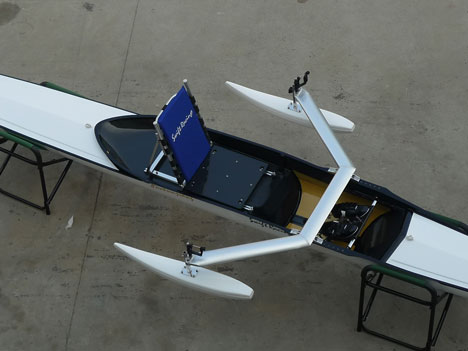
  • Pontoons: Stabilizing pontoons are attached to the riggers to help balance for rowers who cannot use their full lower bodies to stabilize the boat.
Project Ideas That I Am Most Interested In Pursuing:
  • Improving the dock in terms of wheelchair access while still maintaining the integrity of the dock 
    • Original Issue: "The lower dock floats and when the water is low, the angle is too steep for wheelchairs.  A secondary ramp has been installed, but is narrow, near the edge of the dock, and is damaging the wood at the intersection" (Amy Banzaert)
  • Figuring out how rowers can become more independent in moving their rowing equipment
    •  Original Issue: "Rowers currently need assistance bringing oars, pontoons, life jackets, and boats to the dock." (Amy Banzaert)
  • Designing or improving adaptive devices for one-handing rowing
    • Original Issue: "Adaptive devices for one-handed erging are of interest. They have been developed previously but there may be further opportunity." (Amy Banzaert)
  • Improving boat balance for rowers with limited mobility, especially amputees
    • Original Issue: "Balance is a challenge generally for rowers with limited mobility and particularly difficult for amputees with a center of mass off of the body's centerline.  Any solution would ideally be something the rower could carry and install him/herself." (Amy Banzaert)
Questions for CRI Coaches/Staff/Adaptive Rowers:
  • What kinds of disabilities can you currently accommodate?
  • Do you provide rowing opportunities for visually impaired people? If yes, how does that work?
  • How do you accommodate people with back problems that prohibit them from leaning forward?
  • Do you do team adaptive rowing or just individual adaptive rowing?
  • How do you currently compensate for people with centers of mass that are not directly down their bodies (amputees, people with muscular atrophy in just one limb, people with one limb a different length from the other, etc.)? 
  • How do you think the adaptive rowing process could be improved?
Sources:
  • http://www.dezeen.com/2012/08/31/paralympic-design-adaptive-rowing-equipment/
  • http://sites.temple.edu/mariakalishchentsovprofessionaltrpsychrt/2013/02/18/adaptive-rowing-video-using-the-front-rower-rowing-system-for-adapt-sport-recreation-leis-ser-sec001-class/
  • http://www.frontrower.com/

"Being Wrong:" The Intersections of Wrongness and Product Creation

     The lessons learned from the book "Being Wrong" by Kathryn Shultz can be applied in many ways to the process of product creation. This book masterfully illustrates why product creation must include and even embrace being wrong, and yet how we as humans and as a society are not psychologically inclined towards purposefully being wrong, admitting our wrongness, or even correcting ourselves in the face of our wrongness. 
     Our whole approach to being wrong is contingent upon the oft-reinforced belief that error is shameful, something to hide or deny at all costs, because "it feels safe and pleasurable to be steadfast in our convictions" (p. 173). But this philosophy of sorts does not work at all when it comes to product creation. 
     The phrase "fail early to achieve success faster" basically sums up how scientists, especially engineers, must approach problems. This is because we know that, because it is impossible to create the perfect product, products must fail often in order to succeed. But this fact is very difficult for many people to accept, even subconsciously, because our whole society and psychological wiring is working against us. Especially because "we are usually much more willing to entertain the possibility that we are wrong about insignificant matters than about weighty ones" (p. 13). Unfortunately, a "failed" product is often perceived as a weighty matter - something that we have put so much time and energy into cannot just be wrong.
     So, basically, in order to design a good product, we must ignore everything we think about being wrong, ignore our subconscious mind, and make a conscious effort to embrace failure as a crucial step in the process of product creation... That should be easy, right?

Tuesday, October 1, 2013

Small-Scale Prototyping: Strap-On Rollerskates

Ever wish you could roller skate to class and then not have to carry around those giant stakes afterward? Well now you can! With these beauties that Amy and I designed and built:
The Minion Skate
Yes, they are still kinda large, but that is only because our materials and building expertise were limited. The idea itself was sound! And they have minions on them...

Note: Yes, we know that strap-on roller skates already exist. We did not, however, realize this when we started designing them, so lets just pretend that they are a new idea.

THE PROCESS
    It all started one day when we were walking back to our dorms from engineering class. We randomly brainstorming and sharing ideas (because we are nerds), when we finally thought of the best idea ever: a whole line of skates, skis, and snowshoes that you could strap over your shoes as you traveled speedily to class.
    By an amazing coincidence, the next week our assignment in engineering class was to design and build a prototype of something. We immediately decided to put our idea into practice, and we chose to create the strap-on roller skates that eventually became the Minion Skates.
    Our original sketch:
Original Sketch
Me drawing the original sketch
    We changed a lot of things between the original plan and the actual finished product. Especially our materials. We changed our materials about 400 times.

Original Materials:
 Base plate Wood
 Foot plate Blue styrofoam 
 Ankle support Blue styrofoam
 Straps Velcro
 Wheels Thick wood
 Axles Metal dowels
 Wheel structure  Wood
 Wheel structure
 - base plate
 - foot plate
 connections
 Metal screws


These are basically the only materials that stayed the same.

We were having a lot of problems with designing our heel support so that the 3D printer would print it out. 

But luckily Professor Banzaert saved the day and figured out how to make the model:


Another problem: Amy was too short to see in the 3D printer... But we figured it out...


And the heel pieces came out beautifully... After we forgot to print out the second heel support. Luckily, Amy was in the lab 5 hours early, so the piece was already printed by the time I got there...

Then we decided to laser cut the wheels out of sheets of plastic.
Materials:
 Base plate Wood
 Foot plate Blue styrofoam 
 Ankle support Blue styrofoam  3D-printed 
 Straps Velcro
 Wheels Thick wood Plastic layers
 Axles Metal dowels
 Wheel structure  Wood
 Wheel structure
 - base plate
 - foot plate
 connections
 Metal screws


After a few tires, we found the right size hole to fit the dowel that we were using as the wheel axle.

Then we tried cutting the metal dowels.... It didn't go well... So we switched to plastic...

We were going to use these stoppers to hold the dowels in place:

But when we put them into the holes in the wooden sides, we discovered that they were already held in by tension.
We were also going to epoxy the plastic wheel sheets to each other, but the epoxy didn't like that idea, so we just let them be loose. And it still moves, so I count it as a success.

We were also going to screw the wooden plates and the foam together.


But that didn't work out because we realized that we could just hot glue it together. We were making a looks-like model, not a works-like model, so the skates didn't have to be weight-bearing.


We then added the velcro, which had an adhesive side.


And they were beautiful, albeit with much different materials than we had planned!

Final Materials:
 Base plate Wood
 Foot plate Blue styrofoam 
 Ankle support Blue styrofoam  3D-printed 
 Straps Velcro
 Wheels Thick wood Plastic layers
 Axles Metal dowels Plastic dowels 
 Wheel structure  Wood
 Wheel structure
 - base plate
 - foot plate
 connections
 Metal screws Different metal
screws
 Hot glue

Then we decorated them and the Minion Skate was born.


Monday, September 23, 2013

Mulit-Function Devices

In the Wellesley college libraries, there are multi-function devices (MFDs) that are both copiers and printers. This blog post is a detailed analysis of the MFDs. I worked on this project with Amy Feldman, so we have similar data/information, although our wording is different.

Analysis of the MFDs

The analysis was created using the 7 stages proposed by Donald Norman in The Design of Everyday Things. 
  • Forming the goal
    • Print: The goal is to print a document from a library computer on an MFD.
    • Copy: The goal is to copy a physical document using an MFD.
  • Forming the intention
    • Print: The person intends to print a document.
    • Copy: The person intends to copy a document.
  • Specifying an action
    • Print:
      • Pressing the print button on the computer
      • Approving the print command
      • Walking over to the MFD
      • Logging into the MFD
        • Press username
        • Type username
        • Press enter
        • Press password
        • Type password
        • Press log in
        • Press ok
      • Approving the print command
      • Pressing the start button
    • Copy:
      • Walking over to the MFD
      • Logging into the MFD
        • Press username
        • Type username
        • Press enter
        • Press password
        • Type password
        • Press log in
        • Press ok
      • Lifting the top off of the copier section
      • Placing the document on the glass in the correct position
      • Closing the copier section
      • Pressing the start button
      • Remove document
      • Press access
      • Press log off
      • Lift top off of copier section
      • Remove original
  • Executing the action
    • Print: Execute the specified actions.
    • Copy: Execute the specified actions.
  • Perceiving the state of the world
    • Print: Seeing paper(s) come out with words and/or images.
    • Copy: Seeing paper(s) come out with words and/or images.
  • Interpreting the state of the world
    • Print: Noting that the paper(s) that came out are connected with the previous actions performed
    • Copy: Noting that the paper(s) that came out are connected with the previous actions performed
  • Evaluating the outcome
    • Print: Comparing the paper(s) that came out with the original electronic document.
    • Copy: Comparing the paper(s) that came out with the original paper document.

    How easily can one:

    • Determine the function of the device?
      • Relatively easily if one is at all acquainted with printers or copiers.
    • Tell what actions are possible?
      • Not particularly easily, as the device is ambiguously covered in various trays, drawers, and buttons.
    • Determine mapping from intention to physical movement?
      • With difficulty, as the device’s screen and buttons do not afford clear understanding of the actions necessary to print or copy documents.
    • Perform the action?
      • Print: With relative difficulty if one is not acquainted with the device and the systems added by Wellesley College.
      • Copy: With relative difficulty if one is not acquainted with the device and the systems added by Wellesley College.
    • Tell what state the system is in?
      • With relative difficulty, as the process takes place completely within the MFD. The MFD does provide feedback in the form of certain sounds, but the user would have to be very, very well acquainted with the MFD in order to determine which sound goes with which state.
    • Determine mapping from system state to interpretation?
      • With difficulty, as the device does not provide good feedback regarding the system state itself, making interpretation difficult.
    • Tell if the system is in the desired state?
      • Somewhat easily, as paper(s) with the desired words and images only come out if the system is in the desired state. However, there is a time lag between achieving of the desired state (by pressing the “Start” button) and hearing the whirring noises that accompany the device’s document production.
    Based on this analysis,

    What is effective about the MFDs?
    The MFDs provide clear feedback about whether or not an action was executed properly, but only after the action is complete. When one perceives the state of the world, interprets the state of the world, and evaluates the outcome, it is immediately obvious whether or not the action was successful.

    What is problematic about the MFDs?
    There are many steps that one must specify and execute in order to print or copy a document. Also, under "perceiving the state of the world," one is not able to sense if an action was executed properly until the paper does or does not come out of the MFD. This is poor feedback and thus problematic.

    Needs Assessment
    Observe (approximately 10-20 minutes of observation)
    • One girl pulled off one of the trays while trying to print
    • People would sometimes ask others how to use the MFDs
    • Some people found the task quite simple and completed it by apparent rote
    • One person got help from others

    Ask
    Methodology: Brief, individual interviews, because we feel that is the most straightforward way to gain personalized perspectives.

    Questions:
    1. What year are you in?
    2. Have you used an MFD?
    3. How often do you use the MFDs per week?
    4. When did you first try to use an MFD?
    5. How would you describe that experience?
    6. How would you rate the ease of use of the MFDs the first time you used one? (scale of 1 to 10, 1 being brushing your teeth, 10 being climbing Mount Everest)
    7. How about now?
    8. How did you first learn how to use an MFD?
    9. If you could change one thing about the MFDs, what would it be?

    Data:
    Person
    Year
    Q2
    Q3
    Q4
    Q5
    Q6
    Q7
    Q8
    Q9
    Whitney
    Fahnbulleh
    2017
    yes
    3x per week
    1st wk
    got help, simple once explained
    5
    2
    explanation
    no obvious flaw
    Kaitlin Bohon
    2014
    yes
    4x
    late July
    slower than previous, mainly b/c of touchscreen typing
    5
    2
    trial and error
    they’re okay — the complications are worthwhile, more intuitive setup would be good, we need more!
    Claire Schlenker
    2016
    yes
    5x
    1st wk
    slightly confusing, overall successful
    5
    3
    instruction booklet
    revert the login system to a computer basis
     *Our sample size is very small, so this data might not be representative of the entire Wellesley College community.

    Try
    Julie (printing): It took me a minute to figure out how to release my document from the queue, even with the instructions. I was not at all sure that I was doing the right things.

    Amy (copying): It took me a while to figure out what the results would be — what size paper, what orientation, and so on. The default “auto” settings are a nice idea, but they don’t tell you what they’re planning, which seems like poor feedback.

    Mind Map


    Brainstorming Solutions (and eating cupcakes)


    Prompt:
    Find something to adjust or add to the MFDs that would alleviate their limitations.

    Brainstormed Solutions:
    • Keyboard below screen for ease of use
    • Extremely attractive individual telling you how to use an MFD (so that you will pay attention)
    • Larger buttons on keyboards and touch screens
    • Simplified screens with removal/enlargement of unimportant/important options
    • Print and Copy buttons
    • Mandatory tutorials
    • Reward system of candy when you successfully use an MFD
    • Easily accessible bowl of candy for the calming of frustrated souls
    • Instruction manual with lots of pictures
    • Voice commands
    • Screens that are step-by-step instructions
    • Completely automated AI that does the whole process for you

    Pugh Chart 
    We did not use all of our brainstormed solutions. We eliminated (most of) the crazy/highly unrealistic ones.

    Criteria
    Current MFD
    Voice Commands
    Simplified Screens / Buttons
    Keyboard Below Screen
    Step-by-Step Screens
    Instruction Manual w/ Pictures
    Mandatory Tutorials
    Candy Reward System
    Cost of physical materials
    S
    S
    -
    S
    S
    - -
    S
    - -
    Human effort required to implement
    S
    - - -
    - -
    -
    - - -
    - -
    -
    - -
    Ease of human adaptation
    S
    ++
    ++
    n/a
    ++
    S
    S
    n/a
    Likelihood of technology error
    S
    - - -
    -
    S
    -
    +
    S
    -
    Time required to implement
    S
    - -
    - -
    -
    - -
    -
    S
    - -
    Time required for use
    S
    ++++
    ++
    +
    ++
    -
    - -
    S


    Sketches of 2 Best Ideas
    We ended up choosing Simplified Screens/Buttons and Keyboard Below Screen as the best ideas that we came up with.


    Other moments...
    Smelling the MFD...For science!
    Making friends.
    Tired.

    More tired.
    I don't know what I'm doing.

    There was some slight death.
    Frustration.

    The MFD got mad.

    Trying to get the MFD to calm down.

    Appeasing the MFD with cupcakes.